


UTM Parameters - What They Are & How to Set Up Correctly

Izmir Mani - Author

Izmir Mani

Author   LinkedIn Logo

5 Minute Read

‘UTM’ in a marketing context stands for Urchin Tracking Module. It is a snippet of code added to the end of a URL to track the performance of specific marketing campaigns.


The name comes from Urchin Software Corporation, which developed the system to measure website traffic sources precisely. The company was purchased by Google in 2005 and became the backbone of Google Analytics.


This leads us to our next point about UTM Parameters automatically appearing in Google Analytics to this day if structured correctly. But before we get too far ahead of ourselves, let’s begin with what exactly they are, when they should be used, and finally, how this data should be interpreted and used to measure campaign performance. 

What Are UTM Parameters?

There are 5 main UTM Parameters (or tags) that you can create to give a full overview of where exactly your traffic is coming from and which campaigns or creative is giving you the best return on investment. 

Parameter What It Tells You Example
utm_source Where Traffic came from. google, facebook, linkedin
utm_medium Type of marketing channel. cpc, paid_social, email
utm_campaign Which campaign. spring_sale, developer_leads
utm_content Which ad, creative or link. video_1, testimonial_ad
utm_term Usually keyword or audience information. property_developers

For example, if I’m running a Facebook campaign on ur digital marketing agency services, I would not just send them to:


https://imcreative.co.nz/


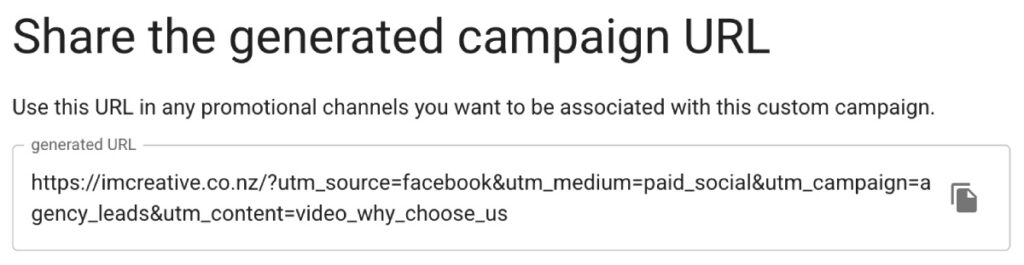
Instead, I can send them to:


In this particular case:


  • UTM Source = facebook
  • UTM Medium = paid social
  • UTM Campaign = agency leads
  • UTM Content = video why choose us

You don’t need to implement all 5 parameters every time, and this was an example where stopping at Content was enough to identify exactly where the source was.

How To Create UTM Parameters

You can either create UTM tags manually in each of your links or use Google’s Campaign URL Builder to automatically add parameters to URLs.


In the previous IM Creative Lead Generation example we used before, we manually created the campaign URL for our Facebook Ad campaign. If you plan to manually create UTM tags yourself, you can follow the following steps:


  • The UTM tags must always start with a question mark: ?
  • Each parameter is written in lowercase and uses an underscore between words followed by an equal sign and the parameter name: ?utm_source=facebook
  • There is an ampersand separating every parameter: ?utm_source=facebook&umt_medium=paid_social
  • The hiearchy of the tags is source, medium, campaign, term, content, campaign ID

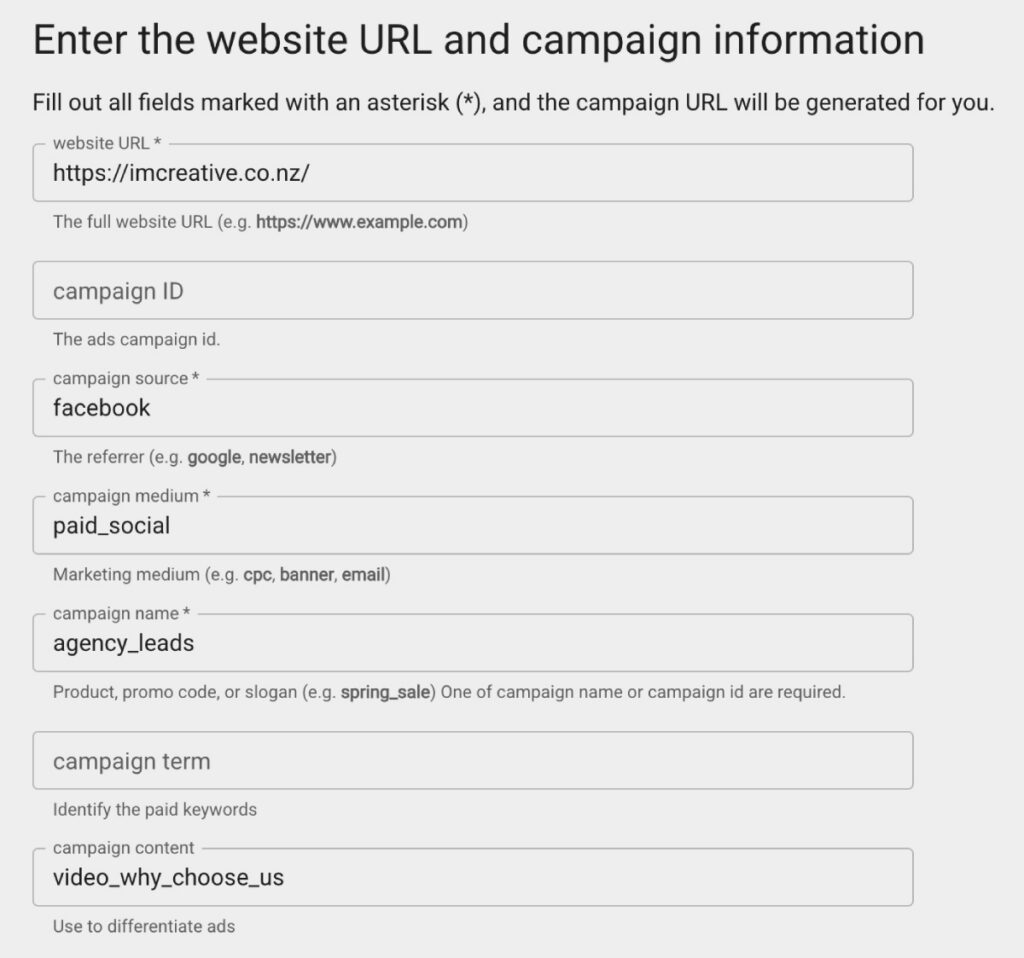
If we were to use Google’s URL builder, it would look something like this:


Campaign URL Builder - UTM Parameters


The generator requires you to create a source, medium, and name as UTM tags with the term, content, and campaign ID as optional. Right below, you will see the generated final URL based on the parameters you have set.


Then, you can copy and paste that link as the final URL in your campaign and ad set. As a reminder, it is worth noting down the exact phrasing you use for each tag. Thus, when you are creating another UTM tracked campaign, you don’t use ‘paid_social’ as one medium and ‘social_paid’ in another instance when they both mean the same thing.


Having a pre-defined naming convention will help eliminate confusion when it comes to analysing the data. Another best practice includes using lowercase for all characters, and the same rule applies when you are searching for them. UTM parameters are case-sensitive.

When Should They Be Used?

Although analytics platforms like GA4 have become pretty good at tracking web visitor sources and mediums without UTM Parameters, they can’t track specific campaigns on their own.


Therefore, UTM Parameters are really useful for tracking visitors coming from social media sources, in particular. Whether it be Facebook, Instagram, LinkedIn, or TikTok, organic or paid, UTM parameters can tell you exactly which campaigns are driving traffic to your website, how people interact with your content and, more specifically, what’s driving sales.


QR Codes are another perfect case study in the usefulness of UTM tags. Whether it is leaflets, brochures, a feature in a magazine ad, or outdoor advertising like billboards and bus stop posters, you can accurately track exactly where that website visitor is from once they scan the QR code. 


On the other hand, if Auto-Tagging is turned on, you don’t need UTM tags on integrated platforms like Google Ads. This is because Auto-Tagging adds a GCLID (Google Click Identifier) parameter to your ad URLs when clicked. This is the case only if you are using Google Analytics and not another tool. If the latter is true, you would use UTM tags too.  

How To Interpret UTM Data

To track down UTM data in GA4, you can go to your Reports dashboard and look for Acquisition > Traffic Acquisition. There, you can filter website visits by parameters such as source, medium, and campaign. 


This UTM data is only as useful as your Analytics setup, and you must configure event tracking correctly. Whether it is leads, online purchases, time spent on page, or engagement rate, you can identify exactly which campaigns drive the most engagement and sales.


Attribution is a crucial metric in marketing. You will get asked about the effectiveness and ROI of a campaign time and time again. That is where UTM Parameters combined with Event tracking provide value. They provide valuable context on your visitors and help you optimise for higher conversions. Importantly, by tracking down the best-performing campaigns, you can present to decision-makers within your business the key channels and content driving growth and revenue.

Need a local Marketing Partner to help out?

IM Creative can either become your full-service marketing arm or work in collaboration with your internal team to deliver outstanding campaigns and results consistently.

Izmir Mani - Author

Izmir Mani

Author   LinkedIn Logo

Izmir is the founder of IM Creative and is based in Auckland, New Zealand. He is a strong believer in the power of storytelling and marketing to truly transform businesses for the better. A problem solver, an avid reader, a football fan, a tennis enthusiast, and a history buff, he looks forward to bringing a unique perspective to every story written.

Digital Marketing Plan
Get Yours Now:

We are happy to answer your questions & get you acquainted with how our digital marketing agency can help your business.

Digital Marketing Services - Get A Quote

🔥DOWNLOAD YOUR FREE DIGITAL MARKETING STRATEGY NOW🔥

GET THE MOST BANG FOR YOUR BUCK👇

Enter your name and email below and receive your FREE Copy within minutes.

[forminator_form id=”2494″]

Ads Management - BookCover

🔥DOWNLOAD YOUR FREE PROFIT MAXIMISING GOOGLE ADS REPORT NOW 🔥

8 Insider Secrets to a PROFIT MAXIMISING Strategy.

Enter your name and email below and receive your FREE Copy within minutes.👇

[forminator_form id=”2105″]

SEO Services - Cheat Sheet

🔥DOWNLOAD YOUR FREE ULTIMATE SEO REPORT NOW🔥

7 Fundamental Tactics to OUTRANK YOUR COMPETITION.

Enter your name and email below and receive your FREE Copy within minutes.👇

[forminator_form id=”2328″]